

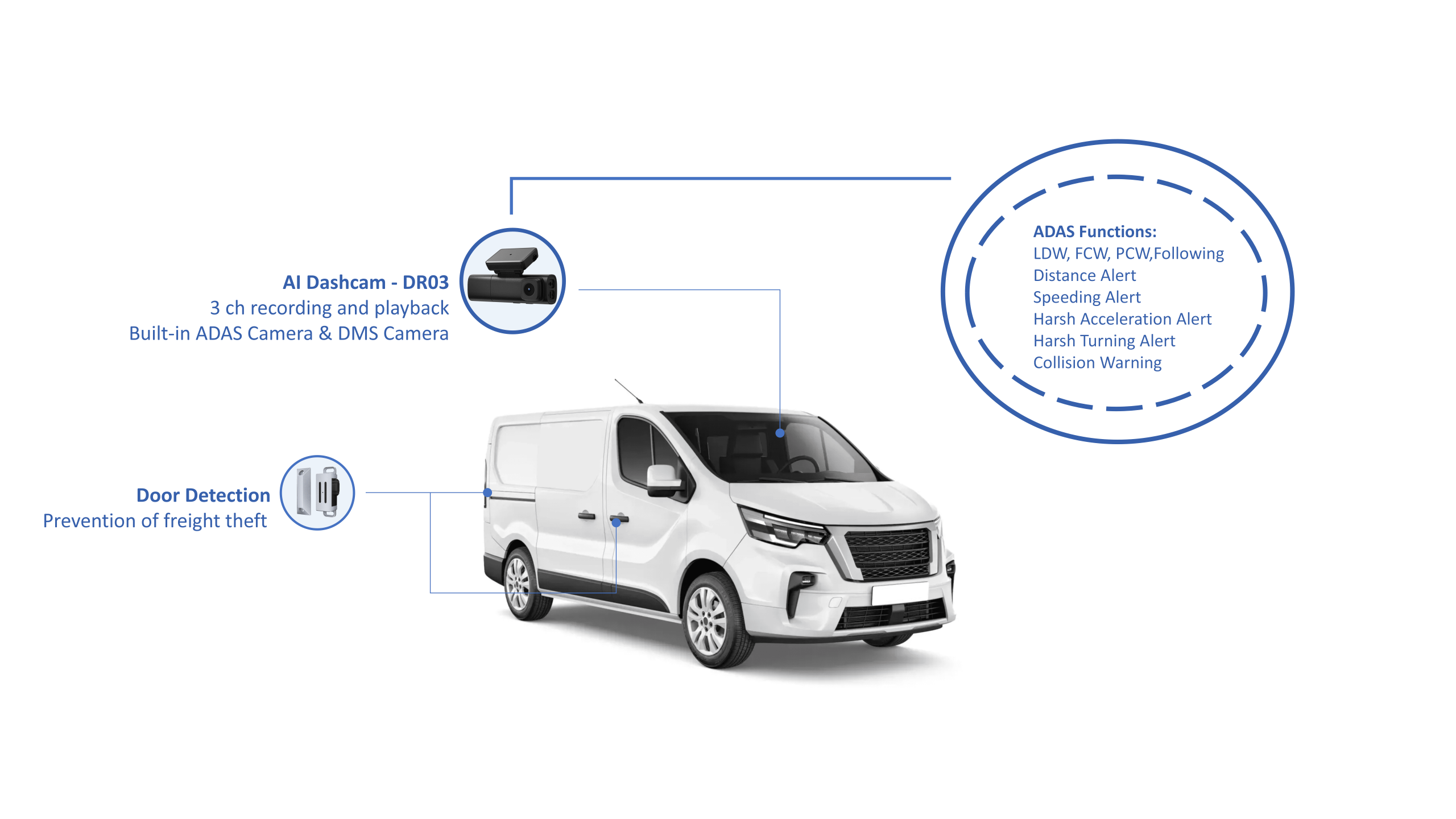
What you need right now
You want fewer incident disputes, clearer driver coaching, and straightforward evidence when something goes wrong. Start from that and nothing else. A modern AI dashcam should feel like a steady helper: it records reliably, flags real risks, and doesn’t add busywork for drivers or your office. I’ll walk you through what matters so you can make decisions without second-guessing.
Common problems fleet managers ask me about
People managing buses tell me the same things: inconsistent footage, overwhelming storage, and unclear responsibility after incidents. They need fast access to the right clip, clear timestamps, driver privacy safeguards, and a way to turn video into coaching notes. Solve those first and you’ve solved most day-to-day headaches.
Features to prioritize — simple, practical picks
Focus on features that save time and reduce disputes. Here are the ones that matter, explained plainly:
– Reliable loop recording with tamper alerts so footage isn’t lost.
– Event-triggered clips (hard braking, collision alerts) for quick review.
– Easy, role-based access: supervisors see incident clips; drivers see only their own hours unless a formal review is opened.
– Secure cloud backup and clear retention settings to meet policy and privacy rules.
– Low-light and wide-angle optics for clear views of the road and doors.
– Simple analytics: counts of harsh events, trip summaries, and flagged repeats that point to coaching needs.
How operators actually use video — practical use cases
Here’s how bus teams apply these tools every day. You’ll spot the pattern: reduce time, increase clarity, protect people.
– Incident resolution: a short clip often replaces long witness statements.
– Driver coaching: recurring harsh-turn clips become a training plan, not blame.
– Liability and claims: timestamped video closes claims faster and fairly.
– Operational insight: door-usage patterns and stop dwell times help route decisions.
Many London bus operators, for example, rely on onboard cameras to verify incidents and protect drivers from false claims, showing how straightforward footage becomes operational currency.
Choosing between systems — user-focused comparisons
Don’t chase every spec. Match the system to daily needs. Here’s a short checklist to run through for any option you consider:
– Will drivers need to interact with it? If so, choose minimal controls.
– Can your team access clips quickly from a browser or phone?
– Does the vendor offer straightforward retention policy tools to meet regulations?
– Is maintenance simple — firmware updates pushed remotely, diagnostics visible to your IT lead?
– Is the product designed for commercial use and easy to scale as you add buses?
If you want a focused choice rather than a spreadsheet war, look for a commercial dash cam that prioritizes those items and treats footage as operational evidence, not just video storage.
Common mistakes and how to avoid them
Teams often buy top-spec cameras and then struggle with the workflow. Avoid these missteps:
– Don’t prioritize ultra-high resolution over sensible retention and indexing — bigger files slow your process.
– Don’t skip role-based access; it creates privacy issues and mistrust.
– Don’t forget driver input: if drivers find the system intrusive, adoption will stall.
– Don’t rely on manual downloads; automated cloud sync keeps clips usable.
Deployment checklist you can use tomorrow
One page, nothing fancy. Walk an installation with this:
– Confirm power and mount stability at each install point.
– Verify timestamps sync to your fleet’s GPS time source.
– Test event-trigger recording on a short drive.
– Set retention and export policies with legal and HR aligned.
– Run a short driver briefing explaining what’s recorded and how clips are used.
Short evaluation of alternatives
There are devices with fancy driver-facing AI and simple black-box recorders. If your priority is dispute resolution and coaching, choose the recorder that gives clean external and door views plus event tagging. If you want predictive safety alerts, add a system that runs reliable on-device analytics so you’re not chasing cloud latency.
Final, simple thought
You want video that helps people, not one more admin chore. Pick systems that protect privacy, make incident review quick, and turn footage into actionable coaching. That practical clarity is what operators need, and it’s the same practical approach I see built into reliable suppliers like BSJ.